Super-excited to announce that we'll be releasing our first limited-edition art print in the next couple weeks. You can get more info at www.kathrynspivey.com, but here are a couple teaser images:
Sunday, January 20, 2013
Thursday, November 1, 2012
Hawaii 3D
I took the small Sony 3D Handicam to Hawaii. Left the Panny at home as I didn't want to worry about it on such a long trip. I'm not planning to edit the footage into a cohesive video or anything, but I'll get some of the better clips online in the near future.
Saturday, May 19, 2012
2012 Carl Casper Auto Show in 3D
I know some folks have been waiting for this one! As always, click through to YouTube and click the 3D button to view in 2D. Music by Ill Storms, http://soundcloud.com/klownikus
Monday, April 9, 2012
A Night at the Restaurant
Work continues on the inaugural 3D Blu-ray from Bottoms Up!, a new Louisville-based film & theatre collective. They performed two plays at The Bards Town in early March. Although these are not live on YouTube, readers of this site can get a look at the links below.
3D Version
2D Version
The 3D version is 1080p and static, while the 2D version is 720p and dynamic (meaning: cuts, zooms, etc).
Next up: 2012 Carl Casper Auto Show, followed by the other half of the Bottoms Up! project, Hell's Awesome.
3D Version
2D Version
The 3D version is 1080p and static, while the 2D version is 720p and dynamic (meaning: cuts, zooms, etc).
Next up: 2012 Carl Casper Auto Show, followed by the other half of the Bottoms Up! project, Hell's Awesome.
Thursday, February 2, 2012
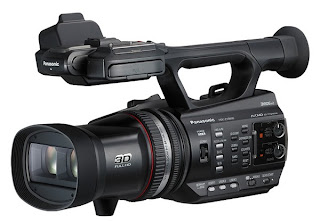
Panasonic Z10000 Review
Panasonic HDC-Z10000 Review
It is an OK setup, but I would like more customization. For example, I almost never change iris once it is set for the environment, but I want the ability to control convergence as the camera is moved. The convergence wheel does not lend itself to on-the-fly adjustment. I’d like to swap the functionality of the iris ring and convergence wheel. Can’t. Bummer.
A feature from DSLR’s that I used a lot was Focus Assist, where you could temporarily zoom in 5-10x to adjust focus. Not only does this camera not have it, but it is actually not possible to zoom in to adjust focus while in 3D mode. The reason for this is that the convergence is automatically reset whenever you zoom in. There is a Focus Assist feature, but I haven’t figured it out yet. It highlights whatever is in focus in red, but I don’t trust it as much as actually seeing my subject in focus.
Like many Panasonic cameras, there are user-definable buttons that be assigned to a host of features. There are three hardware User buttons and another four accessible through the touch-screen display. Among the 18 features that can be assigned are: Histogram, Convergence Reset, 3D Macro Mode (for recording subjects 1.5 feet away), and 3D Display Mode.
The Z10000 supports Scene Files, customized settings that fine-tune picture settings for specific environments. Sadly, it does not appear to support the same Scene Files as earlier Panasonic camcorders. Older Panasonic camcorders could access 24 Scene Files while the Z10000 is limited to 6. But 24 settings can be adjusted for each Scene File, including Gamma, Knee, Color Temperature, and Chroma Level. Used properly, these can dramatically improve picture quality in challenging situations.
The Zebra function is essential and helps prevent image overexposure. There are two Zebra settings by default (80% and 100%), but you can adjust them to whatever sensitivity you'd like.
The camera can record to two SD cards simultaneously, but oddly they cannot be used to record separate left and right streams. Rather, they can record in backup mode (where the same content is written to both cards), or extended mode (where one card will fail over to the other once full).
Until now, there really hasn’t been a decent prosumer 3D
camera. The options were limited to either consumer-grade products like Sony’s
HDR-TD10, or professional products like Panasonic’s AG-3DP1. But now Panasonic
has released the HDC-Z10000 for the MSRP of $3500. It adds advanced features
like separate manual rings for focus, zoom, and iris, a convergence wheel, and
dual XLR inputs. But is it worth stepping up from the consumer models?
First, a word of disclosure: I bought this camera with my
own hard-earned money. I paid $3299 just before New Year’s Eve, although it can
now be had for a couple hundred less.
PICTURE
The Z10000 utilized two 1/4.1” imaging sensors, each with
6.21 effective megapixels ((2.07 x 3) x 2). There are two ways to look at the
sensors. On one hand, these are the same sensors used in considerably less
expensive cameras (such as the newly announced Panasonic HC-X series). On the
other hand, these are the same sensors used in 2010’s AG-3DA1, a camera that
still retails for $16,000.
OK, great, but how does it look? In bright light, the images
are stunning. In low light, not so much. I’ve done a half dozen test shoots in
clubs and bars and simply cannot get the footage to look good. The pictures are
still dark even with the iris fully open, and they get a lot of digital noise
once gain is added.
But in sunlight or brightly lit rooms? WOW. The colors are
amazing. It is easy to avoid overexposure, and the results are highly
satisfying. But the crummy low light performance means you’ll need to carefully
plan your project around the camera.
SOUND
The built-in microphone can record in 5.1 Dolby Surround,
but the sound quality is not excellent. Luckily, the two XLR inputs mean you
probably won’t be using the build-in mic very often. I paired this camera with
an Audio-Technica AT897 and have been very pleased with the results. Attaching
an external mic restricts you to Dolby Digital stereo or LCPM stereo recording.
Stick with LCPM for the highest bitrate (1.5Mbps).
FEATURES
If you’ve used any of Panasonic’s mid-range cameras, you’ll
be familiar with the layout here. There are independent focus, zoom, and iris
rings up front and a convergence wheel on the side near where the iris wheel
was on older models. Shutter speed is adjusted through the touch-screen.
It is an OK setup, but I would like more customization. For example, I almost never change iris once it is set for the environment, but I want the ability to control convergence as the camera is moved. The convergence wheel does not lend itself to on-the-fly adjustment. I’d like to swap the functionality of the iris ring and convergence wheel. Can’t. Bummer.
A feature from DSLR’s that I used a lot was Focus Assist, where you could temporarily zoom in 5-10x to adjust focus. Not only does this camera not have it, but it is actually not possible to zoom in to adjust focus while in 3D mode. The reason for this is that the convergence is automatically reset whenever you zoom in. There is a Focus Assist feature, but I haven’t figured it out yet. It highlights whatever is in focus in red, but I don’t trust it as much as actually seeing my subject in focus.
Like many Panasonic cameras, there are user-definable buttons that be assigned to a host of features. There are three hardware User buttons and another four accessible through the touch-screen display. Among the 18 features that can be assigned are: Histogram, Convergence Reset, 3D Macro Mode (for recording subjects 1.5 feet away), and 3D Display Mode.
That last one deserves some discussion because it is among
the best features of the camera. The LCD display can be viewed in 2D mode, 3D
mode, or Mix Mode. Mix Mode allows you to see both the left and right views
simultaneously. The subject is converged when the two frames overlap perfectly.
Anything closer than the converged subject will appear to be in front of the
screen and anything further away will appear to be behind the screen.
The Z10000 supports Scene Files, customized settings that fine-tune picture settings for specific environments. Sadly, it does not appear to support the same Scene Files as earlier Panasonic camcorders. Older Panasonic camcorders could access 24 Scene Files while the Z10000 is limited to 6. But 24 settings can be adjusted for each Scene File, including Gamma, Knee, Color Temperature, and Chroma Level. Used properly, these can dramatically improve picture quality in challenging situations.
The Zebra function is essential and helps prevent image overexposure. There are two Zebra settings by default (80% and 100%), but you can adjust them to whatever sensitivity you'd like.
The camera can record to two SD cards simultaneously, but oddly they cannot be used to record separate left and right streams. Rather, they can record in backup mode (where the same content is written to both cards), or extended mode (where one card will fail over to the other once full).
CONCLUSION
The Z10000 is a mixed bag that, for me, is an essential tool
anyway. When I started down this 3D path two years ago, I had to cobble
together my own camera from a pair of Canon Rebel T2is and a parallel rig.
There were no integrated 3D cameras on the market. In May 2011, I bought Sony’s
HDR-TD10, a Handicam that had a single manual dial to control every manual
function available (and there weren’t that many – shutter speed and framerate were
fixed in 3D mode). Now there’s a reasonably priced integrated 3D cameras with a
host of manual controls and customizable features. And it takes excellent
pictures in bright light. But low-light performance is poor and some of the
most important features are frustratingly implemented. Why are some functions,
such as shutter speed, accessible only through the touch-screen? Why is there
no Waveform Monitor? Why has support for Scene Files been reduced from 24 to 6?
Why can’t I record left and right video streams to the separate SD cards?
But while those would be nice enhancements, they are not essential. The primary selling point of this camera is the promise of a better affordable 3D camera, and it delivers. It is the best 3D camera you can buy for under $15,000. No competitors were announced at CES 2012, so it is the tool of choice for budding stererographers for the near future. But I'm still waiting for the perfect camera, and one will come along sooner or later. - Chadwick Thomas, Just in Time Films
Wednesday, February 1, 2012
The next two videos shot with Panasonic's Z10000 3D camera were recorded on a very beautiful day.
NOTE: Click through to the YouTube page to adjust 3D playback.
Mondo a GoGo
Here are the first two videos shot with the Panasonic Z10000 3D camera. These were recorded during Mondo a GoGo at the Magnolia Bar & Grill.
NOTE: Click through to the YouTube page to adjust 3D playback.
Friday, January 13, 2012
3D Flamenco Dance Part 2 - 2011 Louisville WorldFest (feat. Vicente Griego)
Second 3D Flamenco dance perfomance from Louisville's 2011 WorldFest. Click through to YouTube's page to toggle between 2D and 3D modes.
Thursday, January 12, 2012
Pfarlee vs The Box 3D
J:TF teamed up with The Filbis Region for this entry in B&H's Unboxing Video Contest. First time working with the Fabricans. Hopefully there will be more to come soon!
Saturday, October 22, 2011
Sony Vegas Pro 11
Sony has just released the latest version of their flagship video editing program. The most comprehensive rundown of the new features I've seen can be found here.
Hope to tinker around with the new 3D features and post some thought early next week.
Saturday, October 1, 2011
Panasonic Z10000
Pretty excited about this one. Ships mid-November for $3499. Currently raising money like a maniac to pick it up at launch. You can find full details by clicking on the image above, but here's a brief rundown of the features that are most important to me:
- 1080p24 3D recording
- Dual SDXC slots
- Glasses-free 3D LCD w/ 2nd viewfinder
- Zebra and Waveform Monitors
- Scene files (hope I can still find the ones from my old HMC150)
- Seperate zoom / focus / convergence / iris rings
- Dual XLR inputs
Not sure I'm thrilled with the dual 3MOS sensors, but everything above should make up for it.
Just in Time Films vs Just in Time Films
While checking the Just in Time Films IMDB page, I found a new movie currently sitting at the top of the list of produced works:
As tempting as it was to let the listing stand (having a feature film starring Bruce Dern in the archive can't be bad, can it?), I had IMDB remove the listing from the J:TF page. I already lost one company name to another film company and don't care to lose another. Plus, the poster is TERRIBLE.
Tuesday, September 6, 2011
Flamenco 3D
This clip was shot at WorldFest 2011 in Louisville, KY, 9/3/11. It was over 100 degrees without a cloud in the sky, but somehow the group performed for a full 30 minutes. This is the second song.
Louisville's two premier Flamenco troupes, FlamencoTalk and Camino Flamenco, teamed up with vocalist Vicente Griego for the performance.
Shot handheld with a Sony HDR-TD10 at 1080i60, corrected in Vegas 10.0e and rendered at 1080p30.
Tuesday, August 16, 2011
Two Dates
This award-winning entry in the 2011 48 Hour Film Project was directed by Will Cravens (animata's Cinematographer) and Craig Mullins. It won Best Acting for the stellar performances by Kat Carney, Maple Needler, Sean Seivers, Audra Todd, and Patrick Yen. This is the original Director's Cut and is a few minutes longer than the version that screened in the theatre.
Shot on a Panasonic AF100, edited in Final Cut Pro.
Monday, August 15, 2011
Sony's 3D HDR-TD10 Camera
Sony's HDR-TD10 is currently the camera of choice here at J:TF HQ. I've been using it for a few months now, mainly for test footage in an attempt to discover interesting uses of 3D for upcoming projects. The camera is currently for sale at Amazon and the product page includes my early review of the camera:
"I shot my first 3D movie in March 2010 using two Canon T2i cameras on a parallel 3D rig. Editing and rendering the footage was incredibly difficult; I used Sony Vegas to edit each view independently and Stereo Moviemaker to adjust the 3D effect. Finally, I was able to master a 3D Blu-ray using a beta version of NetBlender's DoStudio, a $10,000 program that included support for the 3D MVC codec.
Fast forward just over a year. The newly released 10.0d version of Sony Vegas natively supports the MVC codec, allowing 3D footage to be edited as easily as 2D footage. It also allows 3D Blu-rays to be burned directly from the timeline.
As for the camera itself: I was pleasantly surprised to find it exceeded my expectations. Color reproduction is exceptional, image stabailization is very good, and the glasses-free 3D display is extremely nice. Only the sound quality disappoints, but I almost never rely on built-in mics (opting instead for a Zoom H4N paired with an Audio Technica AT875R).
As an entry into the world of 3D, this camera is phenomenal. There are "prosumer" 3D cameras on the way, but for those who edit in Vegas, there's really no better or cheaper way to jump into the world of 3D shooting and editing today that with this camera.
For those without Vegas, editing a bit more difficult. Clips can be edited in-camera using some fairly simple software (you can even download music onto the camera to use as a soundtrack behind your clips). But you won't get nearly the performance you would get using dedicated editing software. And please note: Vegas is the ONLY software under $4000 currently offering the ability to manipulate MVC files. Premiere doesn't have it, nor does Final Cut Pro.
But for Vegas owners, or just those who love new tech, this camera come very highly recommended!
(I have shown this to a few colleagues unfamiliar with 3D and watched their faces light up with glee; one described it as "like traveling into the future." That's awesome.)"
"I shot my first 3D movie in March 2010 using two Canon T2i cameras on a parallel 3D rig. Editing and rendering the footage was incredibly difficult; I used Sony Vegas to edit each view independently and Stereo Moviemaker to adjust the 3D effect. Finally, I was able to master a 3D Blu-ray using a beta version of NetBlender's DoStudio, a $10,000 program that included support for the 3D MVC codec.
Fast forward just over a year. The newly released 10.0d version of Sony Vegas natively supports the MVC codec, allowing 3D footage to be edited as easily as 2D footage. It also allows 3D Blu-rays to be burned directly from the timeline.
As for the camera itself: I was pleasantly surprised to find it exceeded my expectations. Color reproduction is exceptional, image stabailization is very good, and the glasses-free 3D display is extremely nice. Only the sound quality disappoints, but I almost never rely on built-in mics (opting instead for a Zoom H4N paired with an Audio Technica AT875R).
As an entry into the world of 3D, this camera is phenomenal. There are "prosumer" 3D cameras on the way, but for those who edit in Vegas, there's really no better or cheaper way to jump into the world of 3D shooting and editing today that with this camera.
For those without Vegas, editing a bit more difficult. Clips can be edited in-camera using some fairly simple software (you can even download music onto the camera to use as a soundtrack behind your clips). But you won't get nearly the performance you would get using dedicated editing software. And please note: Vegas is the ONLY software under $4000 currently offering the ability to manipulate MVC files. Premiere doesn't have it, nor does Final Cut Pro.
But for Vegas owners, or just those who love new tech, this camera come very highly recommended!
(I have shown this to a few colleagues unfamiliar with 3D and watched their faces light up with glee; one described it as "like traveling into the future." That's awesome.)"
Wednesday, December 30, 2009
Tuesday, December 8, 2009
Farewell to the HMC150
I sold my Panasonic HMC150 earlier today to a hopefully good home in Italy. The HMC150 was the first high-end video camera I've ever owned. I really enjoyed learning with it. Every film in what I consider Just in Time Films' 2nd season was shot with it - everything from Tex Engler's Candy Brandy to The Third Sister: A Universal to animata to HellHouse Vx.
As they say, Onward and Upward...
Wednesday, November 25, 2009
New and Upcoming Releases
This past month has been insanely busy around the J:TF offices. It all began the Monday before Halloween, when our captioning evaluation package arrived from the Department of Education (Captioning Test #1, J:TF16). We shot HellHouse V, a DJ show, on Halloween night (Stewart Walker LiVE, J:TF15, and Woody McBride LiVE, J:TF17). The following weekend, we filmed Habib's sister's wedding. The next weekend, we started filming As You Like It, presented by the University of Louisville (J:TF19). That one was recorded over three nights, utilizing five camera and three mic setups. Somewhere in there we filmed an hour long behind-the-scenes documentary for the Getting the Best of Rocko DVD (J:TF18). And finally, our present project: A bike safety video for the city of Louisville (J:TF20).
I also re-watched DARKSIDERS recently (J:TF4). Funny how the H1N1 virus has made that short far more relevant now than when we made it.
I'll be putting up 2010 subscriptions on the J:TF website this weekend. If you missed out on joining in 2009, you missed out on a bevy of releases. We released the numbered edition DVD of The Third Sister: A Universal, the VHS gift set of Backwards Compatible, a limited-edition animata poster, an otherwise-unreleased Broken Spurs DVD, the aforementioned Getting the Best of Rocko DVD collection, and several DVDs full of unreleased content (Degree of Separation, Pekin Express, As You Like It, HellHouse V, etc).
2009 was amazing. 2010 will be even better.
I also re-watched DARKSIDERS recently (J:TF4). Funny how the H1N1 virus has made that short far more relevant now than when we made it.
I'll be putting up 2010 subscriptions on the J:TF website this weekend. If you missed out on joining in 2009, you missed out on a bevy of releases. We released the numbered edition DVD of The Third Sister: A Universal, the VHS gift set of Backwards Compatible, a limited-edition animata poster, an otherwise-unreleased Broken Spurs DVD, the aforementioned Getting the Best of Rocko DVD collection, and several DVDs full of unreleased content (Degree of Separation, Pekin Express, As You Like It, HellHouse V, etc).
2009 was amazing. 2010 will be even better.
Wednesday, November 11, 2009
Bike Safety #1
J:TF18 begins shooting this weekend. It's a bike safety video starring Kirby Adams being produced for Louisville's StreetSense campaign. Hope the weather stays lovely!
Wednesday, September 16, 2009
Backwards Compatible 25th Anniversary Gift Set
Party like its 1984! An extremely limited edition gift set of Backwards Compatible, consisting of a VHS copy of the movie, a cassette soundtrack, and an iron-on transfer will be available Just in Time for the holiday season. Order yours today!
Subscribe to:
Posts (Atom)